 ChurnAlert
The one Stripe field Intercom never imports
A small Intercom app that copies Stripe’s cancel_at_period_end onto the contact — so support can ask a customer why they are leaving on the day they decide, not a month later when the subscription finally expires.
Churn was happening, and nobody could ask why until it was too late
Intercom’s Stripe integration is the reason support can see a customer’s plan next to their conversation. It imports a generous set of fields. What it leaves out is the flag Stripe sets the moment a customer cancels, cancel_at_period_end — so a cancellation survey keyed on Stripe data could only fire when the subscription actually ended, weeks after the decision.
I built ChurnAlert to close that gap: an in-house Intercom app that reads the flag from Stripe and writes it onto the contact as a custom data attribute, where segments and series can use it like any other field.
One boolean. Everything downstream — the survey, the win-back offer, the follow-up — Intercom could already do; it just had nothing to trigger on.
Fourteen Stripe fields, and not the one that says a customer is leaving
Intercom’s Stripe app imports the plan, the price, the interval, even the card brand. It does not import cancel_at_period_end — the flag Stripe sets the moment someone cancels.
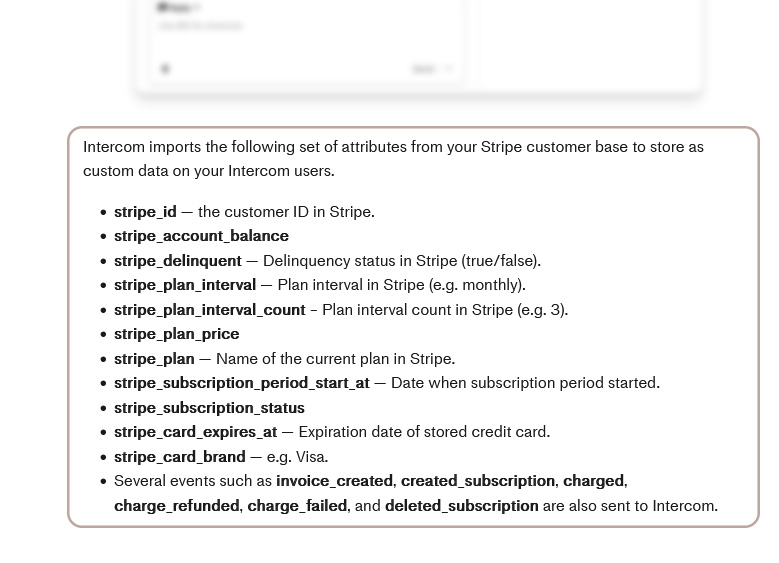
Their own list, kept as it was published. The events at the bottom — invoice created, charge failed, subscription deleted — fire when things happen, not when a customer decides.
Thirty days in which the customer has already left and Intercom still calls them active
A cancelled subscription keeps its Active status until the paid period runs out. Intercom’s suggestion was to wait for that, or to detect the cancellation from a URL change on the front end.
The status flips on day 30. A survey keyed on it reaches someone who stopped thinking about why they left a month ago — and with no period left to win them back in.
The status field has a second trap: a paused subscription is still “Active” to Stripe, so nothing keyed on status can tell a paying customer from one who has stepped away. A flag that says exactly what it means is the only thing worth filtering on.
Two buttons in the Intercom inbox
An in-house Intercom app: connect a Stripe account once, then press Sync whenever the segment should be brought up to date. Nothing else to learn.
ChurnAlertThe sync is a button, not a webhook: the agent decides when the segment refreshes, and the result says what changed. Reconnect re-runs the Stripe OAuth flow when a key rotates.
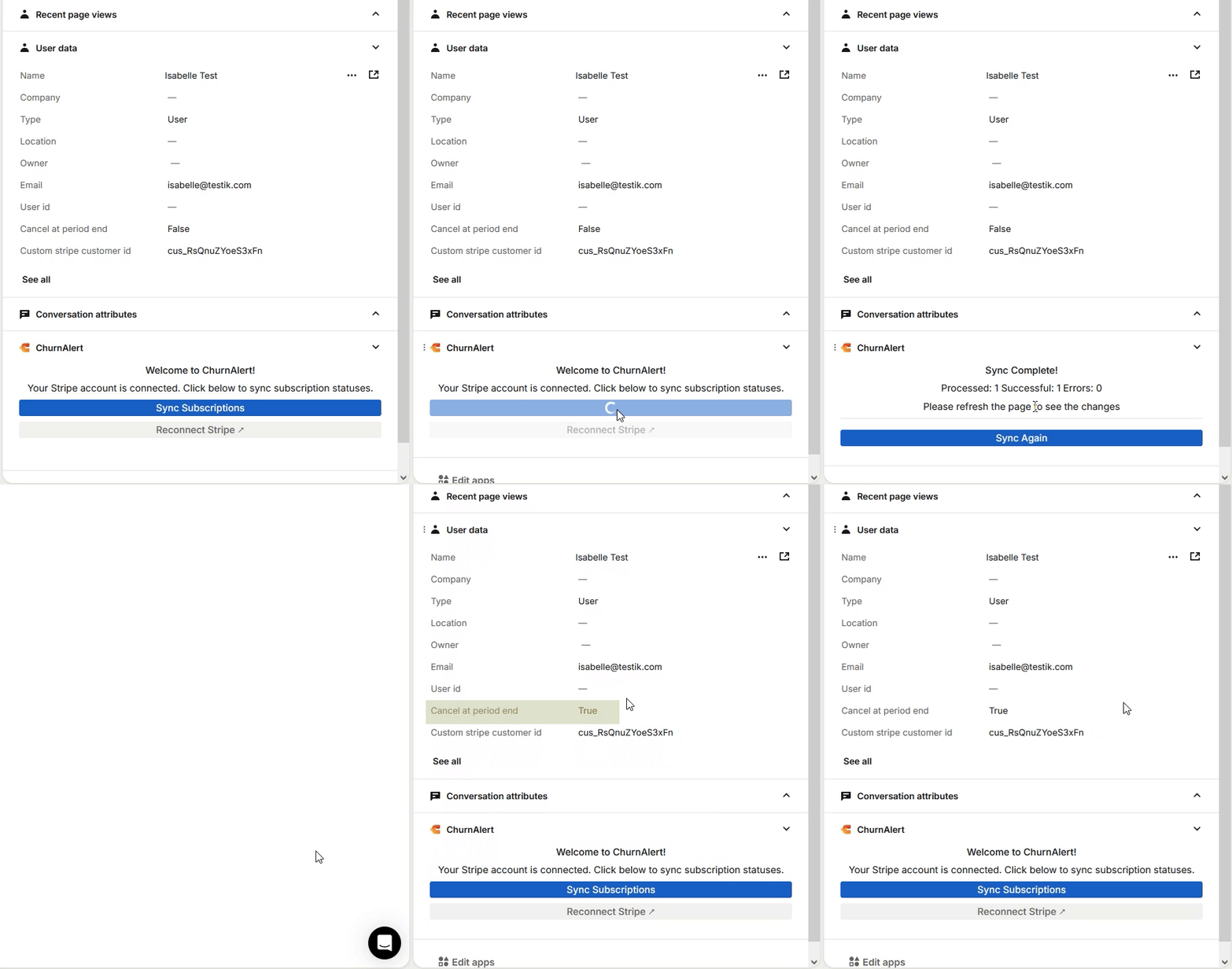
From one field to a retention flow
Read the flag from Stripe, write it to the contact in Intercom as a custom data attribute, and let Intercom’s own segments and series do the rest.
One sync, end to end
Both APIs are behind OAuth, so the app holds two sets of tokens per workspace and refreshes them itself.
What one boolean unlocks
Intercom already knows how to run a series off a segment. It only ever lacked something to filter on.
Before and after
Built in-house in early 2025, for one support team and one Stripe account.